
How to collect profile details and event registration answers
Ask once for stable member details and separately for the choices made for a particular event. Demo Community stores an experience level in the member profile. Demo Workshop asks which station each person wants to join. Changing the station choice for one event should not change a member’s profile.
Before you start
- A Community Manager with settings permissions can configure member profile fields and registration question sets. Reading collected answers requires the relevant community team permissions; participants see their own information.
- Prepare the fields and question set before opening registration. Keep required questions limited to information you need and avoid using event metadata fields for participant answers.
- Use an active member profile setup and an active registration question set. Archived sets are read-only and cannot be selected for a new setup.
No Commolyn community yet? We’ll set up your community and first event with you. Request a pilot
Step by step
Worked example: Demo Community · Demo Workshop. Screenshots use synthetic records.
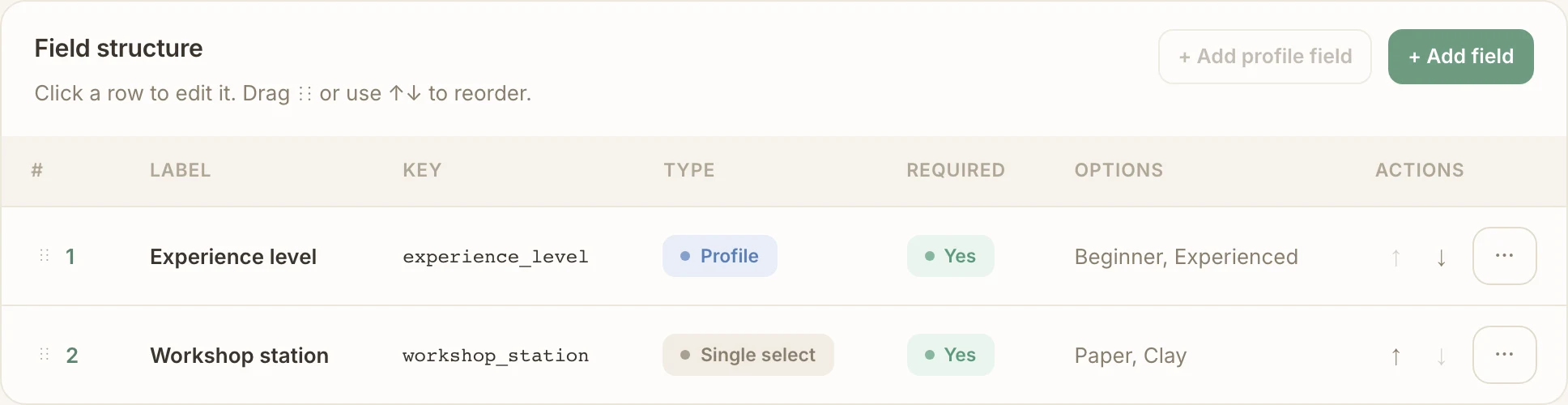
Create the reusable profile field. Open Settings → Members → Member profile fields. Use Set up member profile fields if none exist, then + Add field. Choose Single select, label it Experience level, use key
experience_leveland enter one option per line, such as Beginner and Experienced. Choose Required or Optional, add help text if useful, and save.Create the event question set. Open Settings → Events → Registration questions and choose + New question set. Name it Workshop registration. Add a question from member profile fields and select Experience level, so this registration includes the reusable value.
Add an event-specific question. In the same set, add a new Single select question with label Workshop station, key
workshop_stationand options Paper and Clay. Make it required.This answer belongs to this event, so keep it out of the member profile.
Choose types and order. Pick a type for each field: Text, Long text, Yes / No, Single select, Integer, Phone, Agreement, Country or City. Add options to select fields and the agreement text to Agreement fields. Drag the field handle or use the up/down controls to put profile information before the event choice. Save the set.
Agreement fields are always required. Only the types offered for a field’s source are available.
Apply the setup. In the Demo Workshop editor, select Workshop registration under Registration questions and save. Check the chosen set on the event before publishing and sharing it.
A community default may preselect a set; check the event’s own selection.
Walk through as a participant. On the web, the form shows the configured controls and existing eligible profile values. In Telegram, the bot asks the same questions with prompts and option buttons, and optional questions can be skipped.
Missing required profile details must be completed before registration can finish.
Collect for companions as well. Demo Member A, Demo Adult B and Demo Child C each supply their own profile details and station choice. A companion’s existing profile is used for that companion.
Your answers are not copied to your companions.
View the results. Open the event’s Registrations tab and expand the answers for the right person, or open their participation detail. Member profile values appear in the member’s profile; event answers appear with the participation. Check each companion’s record separately.
Reused values are a starting point
Missing required profile details are collected and saved to that person’s community profile. A registration field sourced from the profile can prefill an eligible existing value; the completed registration keeps its own snapshot. Editing an event answer does not update the member profile. A later profile edit does not rewrite an earlier registration.
For example, Experience level can be reused next month, while Workshop station is asked for the new event. A cancelled registration followed by a fresh attempt collects answers again using current eligible profile values; it does not restore cancelled answers. Agreements preserve the text accepted with the answer. A profile-sourced agreement uses that person’s stored acceptance, not a newly invented consent.
Country and city controls depend on the available geographic catalog and configured restrictions. A city field linked to a country needs the country field earlier in the form. Types offered for event metadata or completion fields are not necessarily available in participant questions.
Troubleshooting
The question is absent
Check that you saved the field and the set and selected that set on this event. A similarly named event field describes the event itself and is not a registration question.
An existing value is not reused
Check the field’s source, type and permitted options. A removed geographic value or a value no longer allowed by the question may need a new answer.
Required fields block a companion
Open that companion’s own form. Required profile fields and agreements apply to each person; making an event question optional does not remove an inherited required profile rule.
Run this workflow in your own community
Request a pilot and we’ll set up your community with the profile details and registration questions your events need.
Request a pilot